Перейти к содержанию
View in the app

A better way to browse. Learn more.

WC3.Info

A full-screen app on your home screen with push notifications, badges and more.

To install this app on iOS and iPadOS
  1. Tap the Share icon in Safari
  2. Scroll the menu and tap Add to Home Screen.
  3. Tap Add in the top-right corner.
To install this app on Android
  1. Tap the 3-dot menu (⋮) in the top-right corner of the browser.
  2. Tap Add to Home screen or Install app.
  3. Confirm by tapping Install.

Жалоба на игрока Smaaail с сервера WC3.Info

  • Читаю для КаЙфА

    Читаю для КаЙфА

  • Дата жалобы

  • Статус жалобы

    Отклонена
  • Игра

    [WC3] Burbenog TD #2762
  • Рассмотрел жалобу

    ars
  • Дата рассмотрения

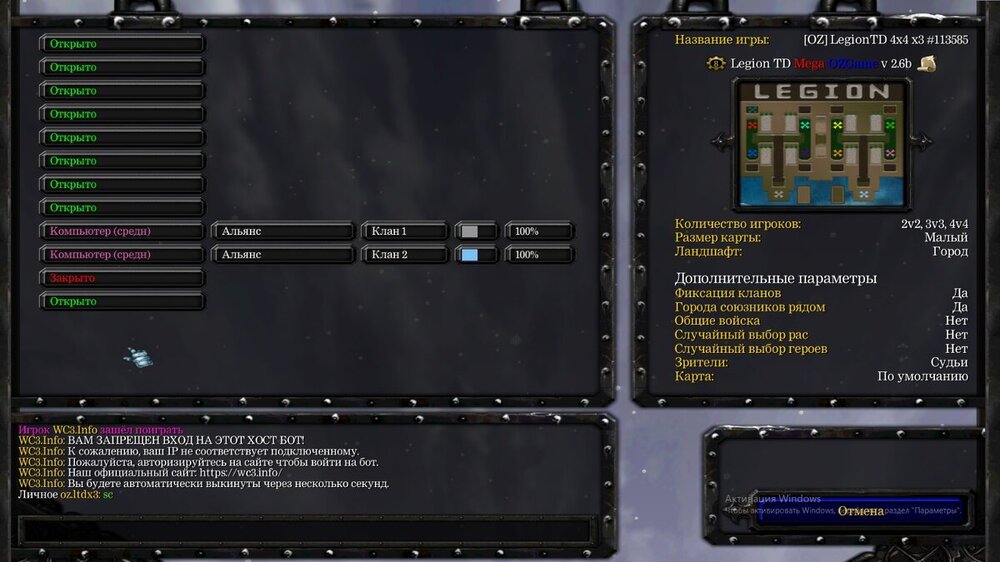
WhatsApp Image 2026-02-20 at 09.04.07.jpegподскажите в чем причина ? на сайте авторизован вчера играл все норм было а сегодня пишет не соответствует подключенному IP

ars

ars

Опубликовано

1) Зайти на сайт wc3.info

2) Ввести свой IP-адрес и нажать привязать. (свой ip-адрес можно найти на сторонних сайтах) или тут https://2ip.ru/

Айпи можно менять себе хоть каждую секунду!

Присоединяйтесь к обсуждению

Вы можете написать сейчас и зарегистрироваться позже. Если у вас есть аккаунт, авторизуйтесь, чтобы опубликовать от имени своего аккаунта.

Гость
Добавить комментарий...

Account

Navigation

Поиск

Поиск

Configure browser push notifications

Chrome (Android)
  1. Tap the lock icon next to the address bar.
  2. Tap Permissions → Notifications.
  3. Adjust your preference.
Chrome (Desktop)
  1. Click the padlock icon in the address bar.
  2. Select Site settings.
  3. Find Notifications and adjust your preference.